Back to Pillar Two
Pillar Two · Accounting

Accounting that grows with your practice.

From a single office to a multi-clinic DSO — on one platform.

Base includes full double-entry accounting built for Canadian dentistry — not an add-on, and not an export to another system. Every invoice, payment, insurance adjustment and deposit posts to your general ledger automatically, so your books are always current and always balanced.

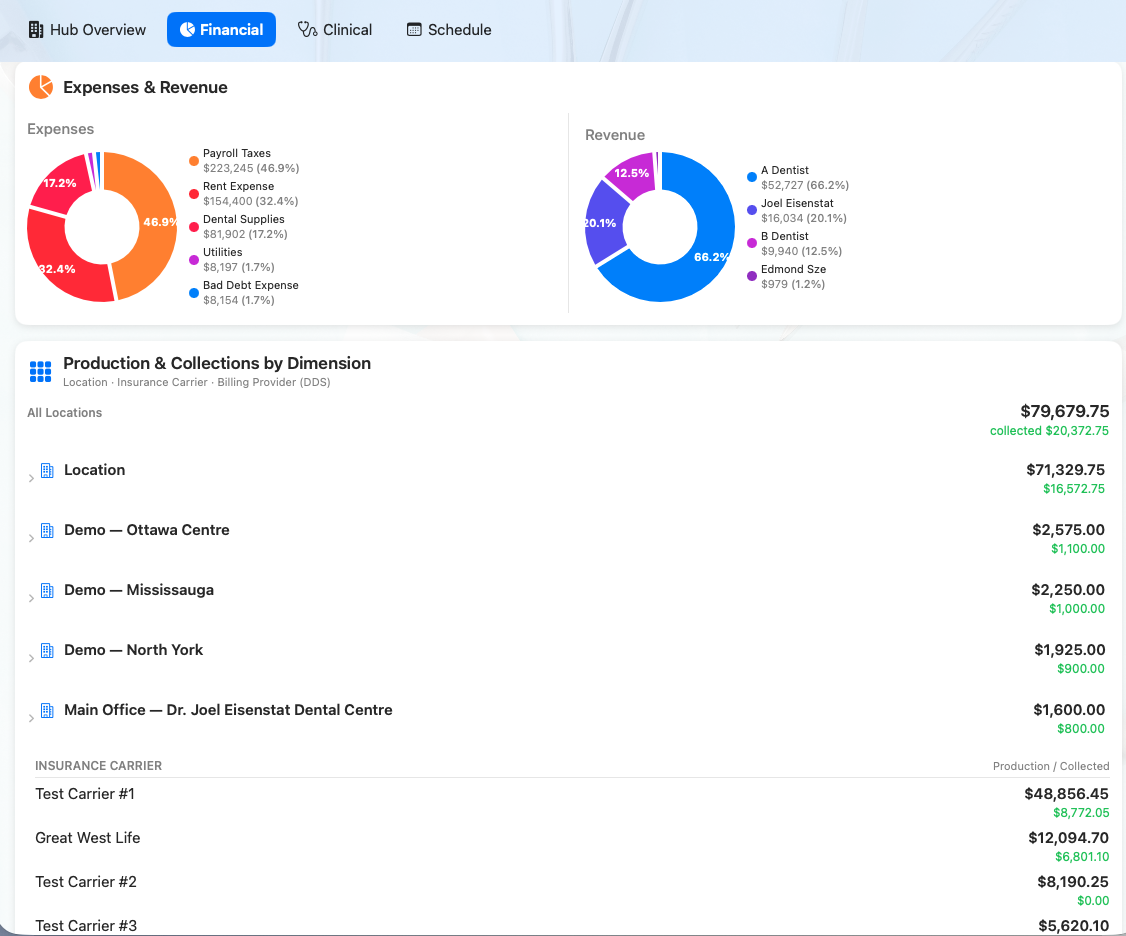
Base Dental accounting dashboard with revenue, expenses, and production by office
Built to scale

One financial foundation at every stage.

Single office

Simple and complete

Always-current books without duplicate entry or month-end catch-up.

  • Automatic GL posting. Services, payments, insurance write-offs and refunds post themselves. No double entry, no month-end catch-up.

  • Patient and insurance AR, tracked separately. See what patients owe and what insurers owe, each aged correctly. Insurance ages from the claim submission date.

  • GAAP-correct deposits. Deposits for prosthetics, orthodontics or large cases are held as a liability until the work is done, applied at invoicing with one click, and unused amounts are refunded properly.

  • Family accounts done right. Each family member has their own sub-ledger, while the guarantor still sees one consolidated family balance — just like the PMS your team knows.

  • Financial statements on demand. Income statement, balance sheet and trial balance, always up to date.

  • Safeguards built in. Warnings before closing an account with money outstanding, confirmed reopening, and balance checks that keep the books in line.

Growing group

One corporation, several offices

Keep one set of books while seeing exactly how every location performs.

  • Every transaction carries its office. Every GL line is tagged with its office automatically.

  • Per-office financial statements. Filter the income statement, balance sheet and trial balance by office to compare locations side by side.

  • One set of books, full visibility. Keep a single corporation while seeing exactly how each office performs.

  • Fee guides per office. Import provincial, social-services and specialist fee guides each year, adjust per office, and let each patient ledger use the right schedule.

Large DSO

Central company and clinic corporations

Add company structure, office-level reporting, and controlled financial operations.

  • A multi-company structure. Set up your management company and each clinic's professional corporation, and assign each office to its company.

  • Office changes by date. When a clinic incorporates or changes hands, reassign it from a set date; history stays with the original company.

  • Company and office filters. Move from organization-wide statements to the company or office view you need.

  • Insurance AR for the whole organization. Claims, EOB-based payment posting, bulk remittance posting, a follow-up worklist and a DSO insurance AR report by office.

  • Role-based access. Keep insurance posting and financial functions with head office or selected staff.

Coming next for DSOs

A cleaner intercompany close.

  • Automatic intercompany (due-to/due-from) entries when head office receives money for a clinic
  • One entry per insurance EFT, matching your bank deposit
  • Month-end intercompany settlement, offset against management fees
  • Consolidated statements with intercompany balances removed, plus an intercompany reconciliation report
Compare plans

The right structure for the practice you run.

Start with one office and move to Group Practice or DSO as you expand. Your history, ledgers and reports come with you.

CapabilitySingle OfficeGroup PracticeDSO
Best forOne locationOne corporation, several officesManagement company plus clinic corporations
Accounting
Double-entry general ledger with automatic posting✓✓✓
Income statement, balance sheet, trial balance✓✓✓
GAAP-correct patient deposits and prepayments✓✓✓
Refunds and write-offs posted to the GL✓✓✓
Per-office financial statements—✓✓
Multi-company structure (management company and clinic PCs)——✓
Office reassignment by date (incorporations, acquisitions)——✓
Company and office report filters—Office✓
Automatic intercompany (due-to/due-from) entries——Soon
Month-end intercompany settlement and management fees——Soon
Consolidated statements with intercompany balances removed——Soon
Accounts receivable
Patient ledgers with family / guarantor roll-up✓✓✓
Separate patient and insurance aging✓✓✓
Deposits held report tied to the GL✓✓✓
Warnings before closing an account with money outstanding✓✓✓
Practice-wide AR totals across offices—✓✓
Insurance (CDAnet / iTrans)
Eligibility, predeterminations and claims✓✓✓
Automatic reading of insurance responses (EOB)✓✓✓
Short-pay, denial and small-balance handling✓✓✓
Insurance follow-up worklist✓✓✓
Bulk insurance payment (remittance) posting✓✓✓
DSO insurance AR report by office—✓✓
One entry per insurance EFT, matched to the bank——Soon
Fees
Provincial, social-services and specialist fee guide import✓✓✓
Fee guide per patient ledger✓✓✓
Office fee adjustments and overrides—✓✓
Controls
Role-based permissions (including insurance AR)✓✓✓
Access restricted to head office or selected staff—✓✓
Growth
Upgrade without migrating data or rebuilding history✓✓✓

Grow without switching systems.

Base posts every charge, payment, insurance adjustment and deposit straight to your general ledger. Add offices, entities, and reporting depth without rebuilding your history.

Request demo access
© 2026 Basedental Software·2178 Kelwing Lane, Manotick, ON, K4M 1B4·613 608 2178·info@basedentalsoftware.com·Privacy Policy·SMS Terms